Adobe Firefly vs Leonardo AI for Game UI and Icon Generation
Firefly prioritizes legal safety while Leonardo offers creative control for iteration.
Game UI and icon generation is a production decision. Summer Engine brings asset creation and game scenes into one workflow, while Adobe Firefly and Leonardo AI each have strengths in making assets. Firefly prioritizes commercial safety and editable design work, whereas Leonardo prioritizes creative control and iteration volume. The right choice depends on which constraint governs the task.
Why game UI and icon work demand a different evaluation than general AI image generation
An icon must work as part of an interface. It often needs a transparent background, a readable silhouette at small sizes, and enough consistency to belong beside dozens of related assets. It must also survive changes in display resolution.
These requirements make the asset pipeline part of the evaluation. Summer Engine integrates native asset generation into a game development environment, where the relevant destination is a scene. Standalone generators must also be judged by how well their assets fit a scene, from the output formats and editing controls they offer to how well they keep the same style across a set. Image quality matters, but it does not settle whether the result fits the game.
Commercial release adds a separate constraint. Any generated asset that ships with a game carries potential IP exposure, regardless of whether it meets the technical requirements. A studio must distinguish permission to use an image commercially from protection against a claim involving that image. Technical suitability and legal suitability are separate tests, and both belong in this comparison.
What each tool is and what trade-off it was built around
Adobe Firefly is a family of creative AI models integrated across Photoshop, Illustrator, and the rest of Creative Cloud. Its own models are trained on licensed Adobe Stock content, including a small subset of AI-generated images submitted by contributors, openly licensed content, and public domain material where copyright has expired. That training policy underpins its commercial-safety position. For teams that already work in Adobe applications, Firefly adds to the design tools they use without bringing in a separate workspace.
The Firefly platform covers images, vectors, video, and audio, and it offers partner models as well as Adobe models. That breadth makes it important to distinguish the platform from the particular model used for an asset. Firefly Custom Models are in public beta on individual and teams plans, as well as some enterprise plans. Free daily generations are available, while Firefly Standard starts at $9.99/mo and the Pro tier costs roughly double for twice as many credits.
Leonardo AI is a creative AI platform with pre-trained models built for game art, character design, concept art, and stylized imagery. It launched in 2022 and was acquired by Canva in 2024, retaining its own product, brand, and roadmap. Its Phoenix model and LoRA-style fine-tuning tools, called Elements, are central to its game-focused offering. The working model is to choose a generator, apply a fine-tune, guide the image, and iterate. That design puts control over repeated generation at the center of the workflow.
Where Firefly's commercial-safety position is a concrete advantage for shipped games
Adobe offers copyright indemnification to enterprise customers who purchase the specific indemnification entitlement. It covers IP claims over some Firefly-generated content, under the terms, conditions, and exclusions that apply. It is not blanket coverage for every Firefly user, subscription, model, or output. Where a publisher or enterprise client requires indemnification, that entitlement can be a condition of a tool’s eligibility.
The distinction matters because commercial usage rights do not themselves provide a legal defense. Even when a team uses an integrated environment such as Summer Engine, releasing a game on Steam, mobile, or desktop makes asset provenance part of the shipping decision. An integrated pipeline does not replace that assessment. Firefly’s training policy and eligible indemnification provide a defined basis for it, rather than leaving the team with commercial permission alone.
Generative Recolor in Illustrator explores palette variations across an icon set or HUD group without manual repainting. Text-to-vector generation produces editable, scalable vector art, icons, and patterns from natural language prompts. That avoids relying on raster-to-SVG auto-tracing, which can degrade the result. Its text rendering is also comparatively strong for labels, HUD treatments, and tutorial overlays.
Those benefits have a creative ceiling. Firefly tends to give images a polished, commercial-clean look, while some game interfaces call for a more dramatic or experimental style. It has no seed control or ControlNet, or other tools for comparable composition conditioning. Teams must rely more on descriptive workarounds when they need outputs that look closely related. Integration with Photoshop and Illustrator reduces workflow friction, but it does not remove those generation limits.
Where Leonardo's creative controls make it faster and more flexible for iterative UI work
Once an art direction is established, the team must repeat the look it has found. Leonardo’s Elements let teams fine-tune in the platform with their own character designs, brand aesthetic, or UI design system. That gives them a generator for their style without the need for local compute or command-line setup. Firefly also has Custom Models in public beta, but Leonardo pairs its fine-tuning with controls that help teams guide generation again and again. For a team producing hundreds of related assets, that combination is its central advantage.
Image Guidance provides ControlNet-equivalent pose and composition control, which is useful when icon silhouettes need to remain consistent. Seed control supports reproducible outputs and variants of the same asset. The Canvas editor provides inpainting, so a team can revise a region while preserving the rest of the image. Transparent PNG output on supported models, plus background removal, addresses another common production requirement. These controls separate decisions that otherwise become tangled together in a prompt.
Phoenix and the pre-trained game-art-focused models also cover common genre aesthetics, including RPG, anime, and sci-fi, without requiring custom training for every project. For teams that need many iterations, the Apprentice tier at roughly $10/mo has a large generation budget, and each extra image costs less at scale than it does on Firefly’s credit tiers. The benefit is throughput under a defined visual direction. Custom model quality can still plateau below a properly configured local LoRA setup when a studio needs very precise style matching.
Leonardo does not provide copyright indemnification. Its paid-plan terms grant commercial usage rights, but responsibility for an IP challenge remains with the user. As of early 2026, no major IP suits arising from AI-generated images had succeeded, but that does not make the risk zero. Free-tier generations are also public in the feed, which matters for unannounced titles.
The specific game UI tasks where each tool is the right reach
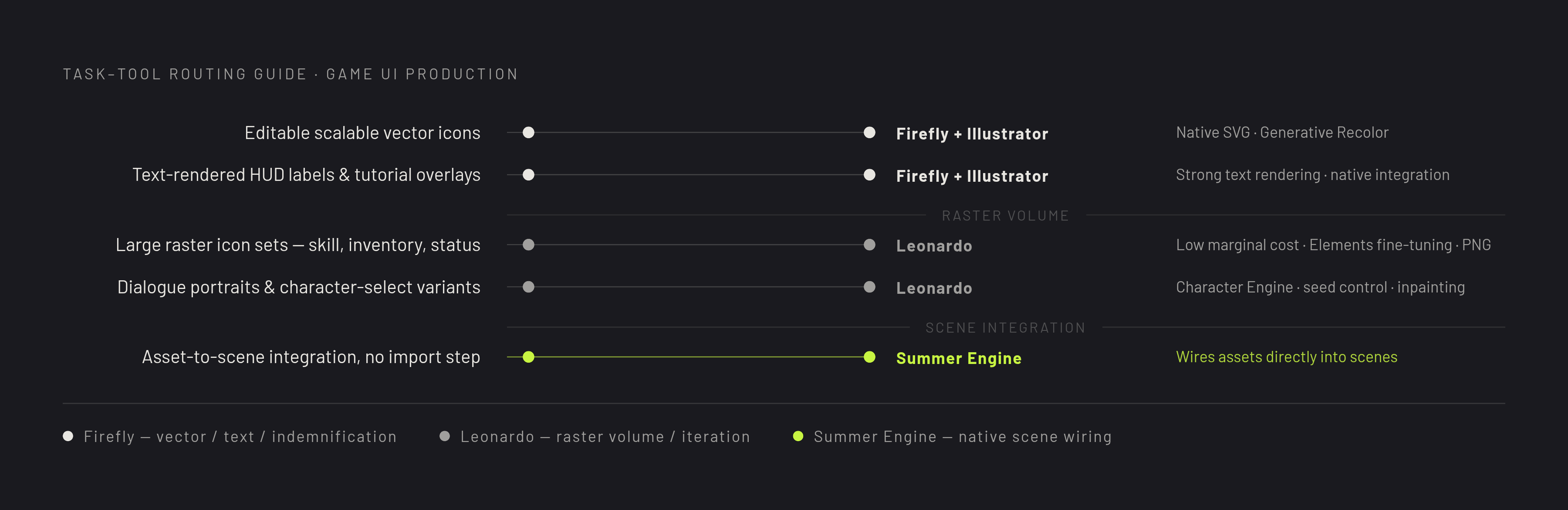
For editable, scalable vector icons, Firefly in Illustrator is the direct choice. Leonardo primarily produces raster PNG and JPEG images, so it does not serve the same role. Menus, frames, overlays, and icons that need native SVG output fit the vector workflow. Existing icon sets that need palette exploration also fit Firefly through Generative Recolor.
Firefly is also the appropriate route when an eligible indemnification entitlement is a contractual requirement. Teams centered on Photoshop and Illustrator have an additional reason to use its in-app generation and Generative Fill. Its skill with text makes it a good fit for labels, callouts, and tutorial overlays that have rendered text. Content Credentials metadata is another reason to choose it when teams need to document provenance, though they still need to make the platform’s submission disclosure.
For large raster sets, Leonardo is the more natural production tool. Skill icons, inventory items, and status indicators benefit from low marginal generation cost and controls that preserve a house style. A team with established reference assets can fine-tune Elements rather than repeatedly describe the same visual language. Where the selected model supports it, transparent PNG output also removes a separate background-removal step. This route fits a tight asset budget with a high iteration count.
Portraits and localized revisions present a related but distinct need. Leonardo’s Character Engine and seed control work well for dialogue portraits, avatar UI, and character-select variants that need to keep the same face. Canvas inpainting suits changes to a border treatment or a specific part of an icon. Neither routing decision eliminates the need to judge the finished asset at its intended size.
How other tools in the field handle the gaps these two leave
Summer Studio has tools for generative 2D and 3D asset creation in a complete game development environment. Summer AI, the in-engine agent, can wire those assets directly into scenes without a separate import-and-configure step. For creators whose main constraint is moving from generated assets to a working game, this is a strong reason to consider an integrated approach first. It addresses the handoff that standalone image tools leave outside their scope.
That distinction does not establish that an integrated environment replaces every specialist control. Teams still need to check for native vector editing, precision in fine-tuning, and copyright indemnification separately. Summer Engine’s confirmed role in this comparison with Firefly or Leonardo is to connect creation and implementation. The stronger fit depends on whether integration or a particular asset requirement is the limiting factor.
Game-specific generators fill a different gap by helping teams make each type of game asset. This approach can cover UI elements, item icons, portraits, sprites, and backgrounds, with transparent output for assets that sit over other art. Sprite-focused workflows can also extend generation into animated sheets and matching directional views. But a tool built around game assets may have no way to train a custom model on a studio’s own artwork. Asset-type coverage and locked house-style control are not interchangeable.
Other tools focus on fine-tuning for a studio, trying out different looks, or making content for LiveOps. Custom LoRA workflows help teams whose results must follow their own reference art, while tools built for concept work are better suited to key art and mood boards than to engine-ready UI systems. Marketing-oriented production tools can combine style training, batch background removal, and several media types. A properly configured local LoRA setup offers another route when hosted fine-tuning reaches its precision ceiling. These approaches fill specific gaps rather than producing a universal replacement for the two tools under comparison.
Building a practical workflow that uses these tools where they are strong
Start by working out the art direction and trying palettes before moving to bulk generation. Use Firefly’s Generative Recolor in Illustrator to explore HUD and icon color systems. Use Leonardo for dramatic concept variations and mood framing where that better matches the intended aesthetic. The purpose of this stage is to establish the visual language that later production must repeat. Generation volume becomes useful only after that language is settled.
Once the style is locked, generate 20–30 high-quality reference icons at the desired look. Use those references to train a Leonardo LoRa-style fine-tune, then use it to make raster icons in bulk. Refine specific regions with Canvas inpainting, preserving the rest of each image. Export transparent PNGs directly where the model supports them. This makes the reference set the anchor for production rather than leaving every asset dependent on a new description.
Keep vector and text work on separate routes. Send menus, frames, overlays, and scalable icons to Firefly in Illustrator for native SVG output. Use Firefly for text rendered inside UI elements, and Leonardo’s Character Engine for portrait variants that need to keep the same character. Where an integrated workflow is preferred, Summer Studio and Summer AI provide the route from generated assets into scenes. The production bottleneck then becomes curation, refinement, and integration.
Carry disclosure through to publication as part of that workflow. Steam requires disclosure during submission, and Valve’s January 2026 update clarifies that the scope covers content that “ships with your game and is consumed by players”. AI developer tools used for workflow efficiency are explicitly outside that scope. Firefly’s Content Credentials metadata supports the process, while creators using Leonardo remain responsible for documenting and declaring their generated assets. Treat that record as part of preparing the release, so the final submission reflects what players will actually receive.