Audio Synchronization Between AI Music Tools and Game Engine Event Systems
AI music generators output files, but game engines need event-driven systems.
A developer generates a track that sounds right in the browser preview. It ends up in a downloads folder, and the game does not know it exists. The problem is not quality. It is that a music generator produces files while a game engine produces events, and nothing connects the two.
Why AI-generated audio files are not yet game music
The felt experience is familiar to anyone who has tried it. A track sounds perfect in isolation: the right mood, the right tempo, the right instrumentation. Then it sits inert. A file has no knowledge of the game's states. It cannot start when the player enters the cave, stop when they leave, or shift when an enemy appears.
That logic must be authored separately, by hand, in the engine. The mismatch is structural. AI music tools are track-output systems. Game engines are event-driven systems. These two designs do not naturally connect, and no amount of prompt improvement bridges the gap on its own.
This is not a quality problem with the generators. It is a category problem. The engine asks "when should this play?" Until both questions are answered, a generated track remains a file, not game music.
What preparing an AI-generated track for engine import actually requires
Before the engine can use a generated track, the file itself needs work. Generators produce audio that is listening-ready, not import-ready. Three properties must be established before a track can be triggered by any event: it must loop cleanly, it must match the project's format, and it must sit at the right volume.
Looping is the first hurdle, and it is per-track work every time. Generators produce tracks with a clear intro and outro. That structure is fine for a song, but a game track that must repeat in a cave needs a beat-aligned loop point. The creator either finds that point manually in an editor, or commissions a middle section designed to repeat. There is no way around it: generate five music cues for a level and this preparation loop runs five times.
Sound effects carry their own version of the problem. Generated clips often include milliseconds of silence or a slow attack at the front. A jump sound with that delay is immediately noticeable, because the action and the sound no longer line up. Trimming to the first sample is mandatory before import.
Volume calibration happens in the engine's audio bus, not the generator. A track that sounds balanced alone will typically drown out effects, or it will sit too loud under dialogue. Sample rate must also be checked and matched to the project's target rate, because mismatches cause pitch or playback issues that surface only on a real device, late in testing.
The cumulative cost is steady friction. Each cue needs the same sequence of edits, and it breaks creative flow. It also grows with project scope: a level with five cues costs five preparation passes, and a game with thirty cues costs thirty.
The two strategies engines use to match music to game state
Once a file is import-ready, you face the engine-side design question. There are two fundamentally different ways to make audio respond to game state, and the choice shapes everything downstream. Horizontal re-sequencing swaps whole tracks at state boundaries. Combat switches to exploration, menu switches to gameplay. A jarring swap between two tracks breaks immersion, so transitions should happen at musically appropriate moments: the next bar or beat boundary, not the instant the state changes. That requires the engine to know where it is in the music's time structure, which is not automatic with a raw audio file.
Vertical remixing takes the opposite approach. It keeps multiple stems, bass, melody, percussion, a tension layer, playing simultaneously and fades them in or out on a continuous intensity parameter. The score evolves without a seam as the player moves between states. Implementation uses a parameter like a float from calm to full combat, with volumes interpolated between states in real time. The costs are twofold: it requires stems rather than a finished mix, which changes what gets requested from the generator, and it carries a higher ongoing CPU cost than swapping files. That constraint matters in open-world games where many audio elements run at once. The choice between the two is not aesthetic preference alone. It determines whether the AI generation step produces a finished stereo mix or separate stems, so you must make that decision before generation begins.
How to wire audio to engine events in a Godot-compatible project
Wiring audio to events is not one step but a layered structure. Node setup, signal routing, and audio manager architecture each serve a different function, and they must be built in the right order. Node setup comes first. A global music track that has no position in the world belongs on an AudioStreamPlayer. Effects that should attenuate with distance belong on an AudioStreamPlayer2D or AudioStreamPlayer3D. The stream is assigned on the node, looping is enabled for background music, and playback starts from script.
Signal-based triggering connects game logic to audio. When take_damage() runs, it calls sfx_hit.play(). When a player enters a trigger area, the active music stream swaps. Signals decouple audio from the systems that produce events, which matters as a project grows: the combat system does not need to know which track plays, only that a signal fires.
Beat-accurate transitions require a different pattern. If a hard state change swaps tracks instantly, it sounds wrong mid-phrase. The correct approach is to queue the next track and complete the transition at the next bar boundary. The Godot Mixing Desk plugin, version 2.13.3 on GitHub, addresses this directly. Its auto-transition feature queues a song for transition when a named signal is emitted, and it outputs beat and bar signals that any node in the scene can connect to. That enables a yield(mdm, 'bar') pattern that delays a game event until the music reaches the right beat.
As the number of tracks and states grows, consolidating audio logic in a single AudioManager autoload prevents duplication. Each game state maps to an audio bus or player, and crossfades or stream swaps happen through the manager, but not scattered across scene scripts. The state-to-track mapping becomes readable in one place.
Sound effect variation solves a different problem: repetition fatigue. The open-source event-audio-godot library on GitHub takes a data-driven approach. Audio is added without modifying scenes or nodes. Multiple variants are associated with a trigger, and a random variant plays on each trigger, so it solves variation fatigue without more generation calls. The library works with both GDScript and C#, and with 2D and 3D scenes.
When the built-in approach is not enough and what the middleware path costs
Middleware audio systems offer capabilities that built-in engine audio cannot match. Designer-facing authoring environments, timeline markers with beat callbacks, and mix automation beyond simple volume interpolation are all real advantages, but they matter most if you have audio designers who already know the tools. The overhead is equally real. Toolchain complexity, licensing costs, and in 2026, active abandonment risk all weigh against the benefit for most indie projects. The site recommends the FMOD GDExtension by utopia-rise as the active alternative, with FmodEventEmitter2D/3D nodes, live Studio updates during development, and beat and marker callbacks.
The economics make the complexity question concrete. For most indie projects, generating stems and states during development rather than at runtime removes the need for real-time procedural systems entirely, and doing so costs a small fraction of a composer commission. The honest conclusion: middleware is the right path for teams with dedicated audio designers. For solo developers, jam teams, and time-constrained creators, the built-in approach with deliberate state mapping covers the majority of real-world game audio needs.
How AI agents inside the engine eliminate the file-gap entirely
The fundamental advantage of an in-engine AI agent over a standalone generator is scene awareness. The agent can see which node is the player, which script handles the jump, and which scene is the menu. That means it can attach a sound to an event rather than handing over a file.
The agent does not produce a track in isolation. It generates the track, identifies the correct AudioStreamPlayer node, sets loop points, assigns the stream, and writes the signal connection, all in one step. The file-gap collapses because the tool that generates also knows the scene.
The Claude Code Game Studios case shows the next scale. Forty-eight specialized agents are organized into a studio hierarchy, including a named Audio Director role. MCP, the Model Context Protocol, lets each agent read files, write code, execute builds, and check results through tool use rather than just generating text.
MCP servers expose engine functionality as structured tools, and AI models can call them. An audio agent can query the scene tree, identify audio nodes, write GDScript signal connections, and verify playback, all through the same protocol. On the DAW side, AbletonMCP connects an AI model to Ableton Live through a Remote Script and MCP server, enabling track creation, MIDI manipulation, clip editing, tempo changes, and device loading. That creates a bridge where composition happens in a DAW and the resulting stems are handed directly to in-engine event logic.
Matching your audio strategy to your generator choices before you generate anything
The most common mistake is generating audio before deciding the synchronization strategy. That forces rework: a finished stereo mix cannot become stems without regenerating, and a track produced without loop-point planning requires audio editing that breaks flow. The sequence matters. Map game states first. List every distinct emotional state and every transition the player can make between them. That determines how many tracks or stem sets are needed, and which transitions must be seam-free. Then choose horizontal or vertical before generating. If states are clearly bounded and transitions can happen at bar boundaries, a horizontal approach with beat-aware swapping is simpler and cheaper. If states blend continuously, such as health degrading or tension rising, vertical stems are necessary, and the generation prompt must request separated layers rather than a finished mix.
Generator choice follows from the output type. Tools built for full songs, Suno and Udio, can suit horizontal strategies, though both now support stem separation and iterative editing, so they enable vertical approaches too. ElevenLabs covers sound effect needs that music generators cannot address. Format decisions belong at generation time. MP3 is acceptable for background music that starts before a player action, where the decode latency is inaudible.
Rights clarity is also a generation-time decision. "Royalty-free" describes a payment structure, not a rights grant: it means no ongoing per-use royalty, not unconditional commercial clearance. Tools like Stable Audio are built with commercial licensing terms as a stated priority, and that matters for games that will ship on Steam or itch.io.
What game jam rules reveal about where AI audio integration is headed
The 2026 jam landscape is sharply divided on AI audio, and the division maps almost exactly onto the synchronization problem. Jams that ban AI do so because they cannot verify that the wiring step was human-authored, not just the file. The restrictions are specific. GMTK Game Jam 2026, which ran July 22 to 26 on itch.io, stated explicitly that generative AI must not be used to make art or audio assets, on penalty of disqualification. Indie Jam, run by Echo Studios in September 2026, banned AI-generated content but permitted AI for non-creative tasks like project organization or debugging explanations, as long as nothing produced by AI appeared in the final game. Synthesis Game Jam 2026, running from May through August, allowed AI tools but required disclosure of every domain where AI was used.
The split reflects the broader maturity question. AI audio tools are ahead of AI audio integration tools, and the gap is exactly what the jam rules police. A team can generate a soundtrack in minutes, but the wiring step remains the place where human authorship is visible, and therefore the place where rules draw their line.
For AI-permissive jams, the strategic implication is clear. The synchronization and wiring step is the predictable time bottleneck. The wiring is already known.
The complete pipeline from prompt to synchronized in-engine audio
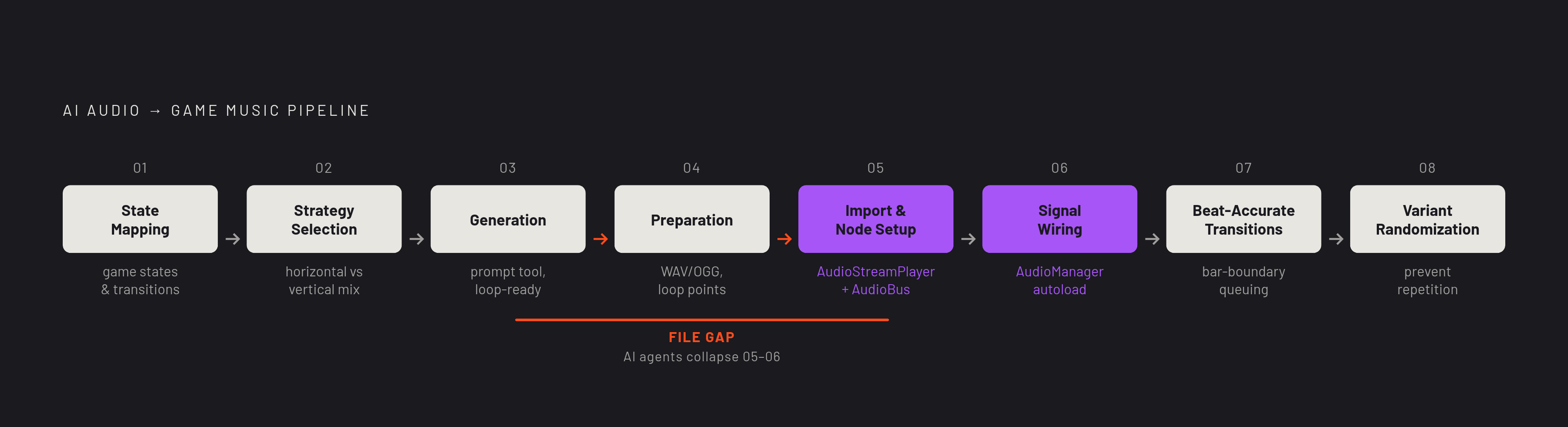
The pipeline from AI-generated track to synchronized, event-triggered audio is a fixed sequence of decisions and steps. Understanding the sequence in advance is most of the work, and seeing the full shape before zooming into the steps makes the whole journey achievable. State mapping comes first. List all game states and transitions before opening any generator. This determines how many audio assets are needed and which synchronization strategy fits. Strategy selection follows: horizontal re-sequencing with full tracks and beat-boundary swaps, or vertical remixing with stems and a continuous intensity parameter, chosen before generation begins.
Generation uses the appropriate tool for the output type, with prompts that specify loop-ready structure and correct format, and files obtained with rights terms appropriate for the target platform. Preparation converts to WAV or OGG, trims silent heads on sound effects, verifies sample rate, and sets loop points in an audio editor or the engine. Import and node setup assigns streams to AudioStreamPlayer nodes, configures AudioBus routing, and sets base volumes relative to the full mix.
Signal wiring connects game logic events to audio triggers via signals or direct method calls, using an AudioManager autoload for project-wide state management. For horizontal approaches, beat-accurate transitions implement bar-boundary queuing, either through a plugin like Mixing Desk 2.13.3 or a custom timer-based approach, so track swaps happen musically rather than abruptly. For sound effects, associating multiple variants with each trigger and randomizing selection prevents repetition fatigue.
Where AI agents compress this pipeline is at the integration boundary. An in-engine agent with scene access can collapse the import, node setup, and signal wiring steps into a single instruction. The generation-to-trigger gap narrows to near-zero when the tool that generates also knows the scene. That is the direction the tooling is moving, and the sequence described here is what the agents will eventually automate.