AI Game Engine Output Quality Compared to Hand-Coded Godot Projects
AI's real advantage in Godot isn't intelligence—it's seeing the game run and learning from failures.
Developers asked which model writes the best GDScript will give a confident answer, usually followed by a benchmark screenshot. It's the wrong question. Every leading frontier model, Claude Opus, GPT, DeepSeek, Gemini, can write GDScript that looks correct and often runs correctly on the first pass. The model was never the bottleneck. What separates a shipped project from a pile of code that half-works is what the AI can actually see while it works, and what it's allowed to do with what it sees.
Call it the runtime-blindness ceiling. A model can write a perfectly plausible movement script, complete with gravity, input handling, and a jump curve that reads fine on paper, but it cannot press Play. It cannot watch the character clip straight through the floor and ask why. It hands over code that compiles, and compiling was never the hard part. The failure only exists once the game is actually running. A model working from text alone has no way to know it's there.
That ceiling bites harder in Godot than in most engines, precisely because Godot's error modes are quiet ones. A null node path doesn't throw a syntax error. A missing signal connection doesn't throw a syntax error. A CharacterBody2D sitting in a scene with no collision shape attached doesn't throw a syntax error either. All three run cleanly, right up until the moment they don't, and by then the AI that wrote the script is long gone from the conversation, a structural fact about where the information the AI needs actually lives. None of this is a knock on model intelligence. It's a structural fact about where the information the AI needs actually lives, and whether the tool wrapped around the model gives it a way to reach that information. That distinction, how deeply the AI is wired into the engine rather than which language model sits behind it, is the variable the rest of this piece is built around.
Godot's file format gives AI a structural head start over Unity
Large language models manipulate text. That sounds almost too obvious to state, but it explains, more than anything about training data or parameter count, why some engines are simply easier for AI to work in than others. Godot happens to store almost everything a project contains as plain, human-readable text: scripts in.gd files, scenes in.tscn files, resources in.tres files, and project configuration in project.godot. Open any of those in a text editor to see exactly what the engine sees. There's no compiled intermediate layer standing between the AI and the thing it's trying to reason about.
Compare that to a scene file that is technically text but practically a database dump: numeric fileIDs, GUIDs, deeply nested YAML that encodes relationships an AI can parse syntactically without ever inferring what the scene is actually for. That's the situation Unity's format puts a model in. It's the difference between reading a sentence and reading a hash table. One real migration made the gap concrete: the same bedroom scene took over 60 lines of Unity metadata before the AI reached a single line of actual game logic, while the equivalent.tscn file described the same room in roughly ten lines, each one carrying a meaning a model can act on directly.
GDScript helps here too, in a way that's easy to undersell. Its syntax borrows heavily from Python, and Python is about as dense as training corpora get, so any frontier model trained broadly on code produces fluent GDScript with very little additional exposure needed. The fluency breaks down at the edges, though, specifically around the idioms that are Godot's own, including signals, the @onready keyword, the Resource class, and the particular grammar of.tres and.tscn files.
There's a structural bonus buried in Godot's architecture too. Its scene-tree, signal-based design imposes one consistent pattern across nearly every project, which gives a model something stable to learn and repeat. Unity still keeps one genuine edge: C# is near the top of the pile in training-data volume, so any model writes it fluently, while Godot's training corpus is smaller but rapidly growing. But the audience most exposed to this whole dynamic skews toward solo developers. The 2025 Godot Community Poll found the majority of Godot users work alone, which is exactly the population most likely to reach for AI help and most likely to feel it when the tooling falls short.
The four-tier framework: how integration depth maps to output quality
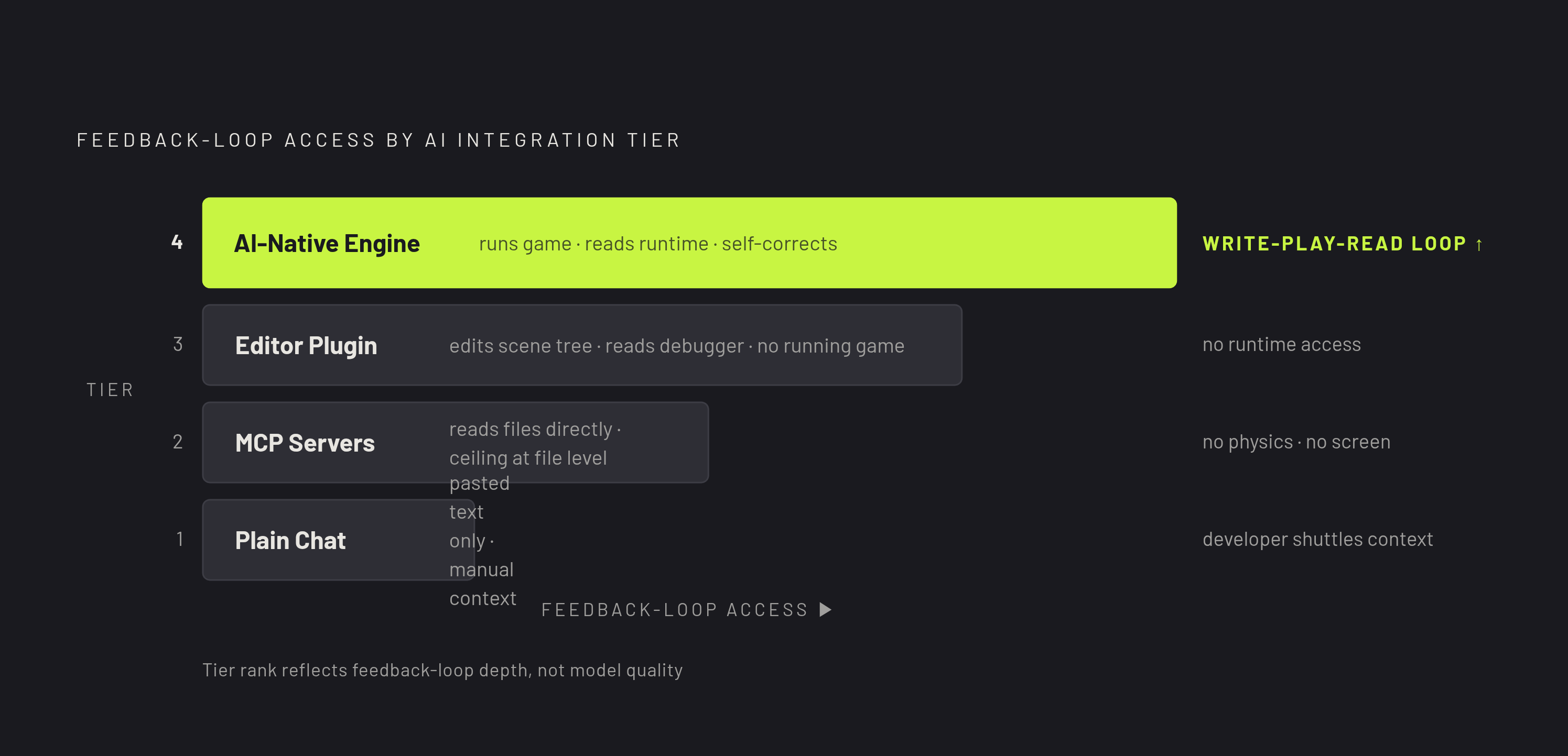
None of the four tiers that follow are ranked by which model they run. They're ranked by how much of the feedback loop, the ability to see the project and see the running game, the AI actually gets access to.
At the bottom sits plain chat, sometimes called paste-and-pray. The AI sees exactly what gets pasted into the window and nothing else; the developer is the integration layer, manually shuttling context in and code back out. It works fine for an isolated function or a one-off script. It falls apart fast on anything that touches the rest of the project, because the model has no memory of what the rest of the project looks like.
One tier up, MCP servers bridge an external AI client to the actual project files. The AI can now read scene files and scripts directly, so it stops guessing node names and signal wiring, which removes a large share of the errors that plague the chat tier. The ceiling here is firm, though: everything happens at the file level. The AI cannot open the running engine, cannot test physics, cannot see what's actually rendered on screen.
Editor plugins go further still. The AI lives inside the Godot editor itself, able to edit the scene tree directly, generate assets, and in some implementations read editor and debugger errors as they surface. That's real progress, but the AI is still sitting on top of the engine, watching from outside. It has no way to interact with the game once it's actually running.
The top tier is what's often called an AI-native engine, where the AI is part of the engine rather than a layer wrapped around it. It understands scenes, physics, and gameplay logic at an architectural level, can run the game itself, read the debugger live while the game executes, and correct its own mistakes based on errors that only exist at runtime. That write-play-read loop is the thing every lower tier is structurally missing.
What moves between these tiers isn't code quality in a vacuum. Any tier can be paired with the same strong model. What actually shifts is how many correction passes a human has to supply afterward and whether anyone catches the runtime-only bugs before they ship. There's a useful, slightly uncomfortable data point for calibrating just how much that matters: a randomized controlled trial from METR found experienced developers were measurably slower using AI tools, even while believing themselves faster. The perception gap was largest exactly where the feedback loop was weakest, which is the plain-chat tier, where the human absorbs every debugging cost the tool itself can't see.
The Godot AI tooling landscape in 2026: what exists at each tier
The landscape has moved fast. A year ago, plain chat was close to the only realistic option; by 2026 there are 11+ serious tools spread across all tiers.
At the plain-chat tier, ChatGPT and Claude.ai remain the obvious entry points: no project access, the AI sees only what's pasted in, but the barrier to entry is low or free, which makes them fine for learning GDScript syntax or knocking out one-off snippets.
The MCP tier has gotten crowded. Godot AI MCP, an open-source project launched in April 2026, is free and connects Godot to Claude Code, Cursor, Codex, or any other MCP-capable client. Godot MCP Pro offers a paid alternative in the same space, and GDAI MCP is another server option sitting in the same tier. For developers who already live inside Cursor day to day, pairing it with a Godot MCP server is probably the strongest option that doesn't require switching editors at all, since it hands the model real project context without asking anyone to change their workflow. The MCP ecosystem is still young, and completeness varies a lot from one plugin to the next, so a given option's offering of read-only context (fine for most prompting needs) versus full write access and command execution (which demands more setup and more trust in what the AI is allowed to touch) is worth checking.
Editor plugins make up the most populated tier. One runs inside the Godot editor directly, generating GDScript and C#, editing the scene tree, producing 2D and 3D assets, and reading editor and debugger errors so its fixes are grounded in what the project is actually doing rather than what it assumes the project is doing; a hobby tier includes a small monthly AI usage allowance with no card required, and a more capable playtest agent that plays through the full game sits behind a paid plan. Separately, an AI Assistant Hub plugin was submitted to the Godot Asset Library under an MIT license, dated 2026-09-01; it doesn't run any models itself but acts as an interface between the editor and a range of LLM providers, including Ollama, llama.cpp, Google Gemini, Jan, Ollama Turbo, OpenRouter, OpenWebUI, and xAI.
The top tier, the AI-native engine, is defined by the write-play-read loop: the ability to run the game, read live debugger output, and correct itself based on runtime errors that no file-level tool could ever see. Backward compatibility matters a lot here in practice, since developers moving into this tier aren't starting from zero: GDScript, C++, and C# all get first-class support, so both non-coders and professional engineers land on solid ground. AI Assistants For Godot 4 is available as an editor plugin option.
One habit pays off no matter which tier gets picked. Putting the engine version and project conventions into a root AGENTS.md file pays off across almost every tool in this landscape, since Codex, Cursor, and editor-level assistants all read it automatically; for Claude Code specifically, adding a single line referencing @AGENTS.md inside CLAUDE.md achieves the same effect. GameDev Assistant is available in the ecosystem as an editor plugin option. Godot AI Suite is offered as an editor plugin option available through a one-time purchase.
Which model to use inside whichever tool you pick
Most of the tools above let a developer swap the underlying model freely, so which model is used is secondary to which tier is used.
Claude Opus currently sits as the most dependable option for Godot 4 GDScript specifically. It produces clean, idiomatic code, handles await and signal chains correctly, and is the least likely of the major models to slip into deprecated Godot 3 habits. It's also vision-capable and can reason directly about a screenshot of a running game, which matters a great deal once visual debugging enters the picture. That capability comes at a real cost per token, but for complex builds it tends to mean the fewest correction passes overall.
GPT trails Opus only slightly on raw GDScript quality and often responds faster on the first pass. It loses a bit of ground on long agentic chains, where small context slips early on tend to compound over many steps, but it's also vision-capable and makes a solid default for general scripting work where speed matters more than squeezing out the last few percent of correctness.
DeepSeek is the budget option, and a genuinely usable one: it writes serviceable GDScript at a fraction of what Opus or GPT cost per token. It needs more correction passes on complex, multi-step agentic tasks, and it's text-only, so it can't look at a screenshot of the game the way the other two can. For straightforward scripting on a tight budget it holds up fine; for visual debugging or long, involved builds, it falls behind.
Independent benchmarking backs up roughly this ordering. On GameDevBench's Godot 4 task set, GPT-6 Astra running in Codex and Claude Fable 5 running in Claude Code scored comparably, both near the top of the field.
One failure mode cuts across every model on this list, regardless of price or vision capability. The public internet is still saturated with Godot 3 code, so every model occasionally reaches for yield instead of await, writes KinematicBody2D instead of CharacterBody2D, calls the old tween API, or uses export instead of @export. Specifying the engine version explicitly in AGENTS.md helps, and following up with a syntax check via godot --headless --check-only --script <file>.gd catches what slips through. None of this changes the larger point, though: a weaker model working inside a full write-play-read loop will generally out-produce a stronger model stuck in a plain-chat window, because the loop catches what the model alone cannot.
Where runtime feedback changes output quality: the evidence
The clearest evidence for all of this comes from an academic evaluation called GameGen-Verifier, published on arXiv in May 2026. Working across a dataset of 100 games spanning seven genres, the researchers found that a system injecting live runtime state and executing bounded in-game interactions reached 92.2% accuracy against human judgments of quality. An open-ended approach that just let an agent play the game freely and judge it managed only 58.8% accuracy against human judgments, versus 92.2% for the system that injects runtime state and executes bounded interactions (a 16.6× reduction in wall-clock time). Structured runtime feedback is a categorically different, stronger quality signal than open-ended play. It's a different category of result entirely.
That finding lines up with what the METR trial found in a professional software context more broadly: experienced developers using AI tools were measurably slower, even while believing the opposite, and the gap traced directly back to time spent debugging errors the tool had no way to catch on its own. The feedback loop, not the model doing the writing, is what determines whether an AI assistant saves time or quietly costs it.
The commercial world offers one striking counterexample. Pieter Levels built fly.pieter.com, a browser-based flight simulator in JavaScript and Three.js, in roughly three hours using Cursor, reaching $87,000 in monthly recurring revenue, equivalent to $1M ARR, within 17 days, drawing 320,000 total players, though the revenue was driven primarily by one-time ad slot sales rather than true recurring subscriptions. Most of that revenue came from one-time ad slot sales rather than durable subscriptions, which matters for how the number should be read. It's also a web stack, where deployment is a single file and the training data behind JavaScript and Three.js is about as dense as it gets anywhere. Almost nothing comparable has shipped through Steam with a full save system, console certification, or multiplayer netcode built purely through AI assistance. The success is real.
A more grounded example of the loop working as intended: one developer, Isaac Dedini, built a card game's entire UI through Claude Code, opening the Godot editor itself only once during the whole process. A custom test runner let Claude compare screenshots of the running interface against the intended design, and that screenshot-comparison loop was the specific mechanism that made sustained autonomous iteration possible. Without the loop, the same model, working from the same prompts, would have produced guesses instead of corrections.
The most reliable use of any AI assistant right now, across every tier, is asking for scaffolding. It's asking for scaffolding: a complete state machine template with the right states named and wired, or a behavior-tree action node with the correct method overrides and return values already in place. That's a task even mid-tier integration, an MCP server or an editor plugin, handles reliably, because it doesn't depend on runtime feedback to get right in the first place.
The version-drift and runtime-blindness failure modes developers hit
Godot 4's class and keyword overhaul left a wide trail of outdated code scattered across the internet, and every model trained on that internet inherited some of it. The most common symptom is a script that references KinematicBody2D, a class Godot 4 replaced with CharacterBody2D entirely. It's not a subtle bug. The script simply fails to load, and the failure often looks, to someone new to the engine, like a mistake in their own project setup rather than what it actually is: a model reaching for a Godot 3 pattern out of habit.
Runtime-blindness failures are quieter and, in a sense, more dangerous, because nothing about them looks like a mistake up front. A missing collision shape on a physics body doesn't announce itself. Neither does a signal that was declared but never actually connected in the scene, or a node path that points to something that no longer exists after a scene got restructured. Every one of these compiles cleanly and runs without incident, right up until a specific interaction triggers the exact circumstance the AI never had a way to observe.
That's the throughline connecting version drift and runtime-blindness: both are failures of visibility, not failures of writing ability. A model that had access to the actual engine version and could watch the game run would catch nearly all of it. A model working from a chat window, with no view into either, has no mechanical way to know any of it happened at all.
Sources
- AI Coding Tools for Video Game Development: A First-Principles Analysis of What Actually Works | by Chier Hu | Medium
- Why AI Writes Better Game Code in Godot Than in Unity - DEV Community
- Best AI Tools for Godot Game Development in 2026 (Tested and Compared) | Summer Engine
- GameGen-Verifier: Parallel Keypoint-Based Verification for LLM-Generated Games via Runtime State Injection
- Why Godot's architecture makes it the best engine for AI-assisted development - DEV Community
- Godot Dev Laments Increasing "AI Slop" Code | TechPowerUp
- JAMER: Project-Level Code Framework Dataset and Benchmark on Professional Game Engines
- State of AI code quality in 2025 - Qodo